So its a final showdown. India and Sri Lanka will go all guns blazing in this fantastic finals of the World Cup 2011. Lets analyze on how the game will progress:
The pitch:
The pitch in Wankhede stadium, Mumbai is conducive to stroke play, with 270-300 being a good target to set for the opposition. Its also conducive to spin as it slows down towards the end. However, unlike the semi-final pitch at Mohali, this should be very much playable until the end.
Batting:
Sr Lanka batting: Probably for the first time, India will face an opposition that has a strong opening pair. India needs some really good bowling in the first 5-10 overs to get a breakthrough. If they can get the top 3 batsmen out cheaply, the middle and lower order is very fragile. Not only that, the middle and lower orders have never really gotten a decent chance to show their skills. We saw a glimpse of how they nearly collapsed in the semi finals against New Zealand. As far as the Indian batting goes, we have seen how demoralizing to the bowlers Sehwag can be. The good thing for India is that he always plays top cricket against Sri Lanka. In this world cup Sehwag has dominated Pakistan and the so-called in-form South African bowling. For Sachin, this is a perfectly scripted tale - Finals of the World cup at his home ground and 100th century in the making.
Bowling:
Sri Lankan bowling: If India can see off Malinga, they can post a mammoth total which can intimidate the Lankans. Another strategy they can adopt is to pulverize him right at the beginning. Though this carries a risk, we know what it can do to someone like Umar Gul. Remember his words "I will target India's top order". He was targeted brutally by Sehwag right from the get go.
Fielding:
Indians have a slight edge here but Sri Lankans are not bad either. Its quite equally posied but I think the trio of Yuvraj-Kohli-Raina adds a punch.
Interesting mythological facts:
Saturday is Hanuman-ji's day. We all know what HE did to Lanka!
In the Surya Sanhita it is said that Hanuman was born on a Saturday (Shanivar). In Maharashtra, Saturday is considered as an auspicious day for His worship.
So who will win?
Its going to be a cracker of a match and my bet is on India to win the match and lift the 2011 World Cup. What do you think? Drop in your comments and analysis.
Friday, April 1, 2011

Friday, March 25, 2011
India Pakistan World Cup Semi Final at Mohali
A mouth watering prospect of a India Pakistan Semi Final in the 2011 ICC Cricket World Cup is now a reality. Billions of cricket fans around the world are going to witness the pinnacle of cricket entertainment on 30th March 2011 when Indian and Pakistan meet head on at Mohali for a place in the finals of the 2011 ICC Cricket World Cup.
The stage is set
The quarter final match on Thursday, March 24th at Motera, Ahmedabad between India and Australia, saw the exit of the reigning World Champions Australia and set up the stage for the mother of all matches, the clash of arch rivals India and Pakistan at Mohali. Surprisingly, India were actually the favorites to beat Australia that day according to the bookies. And they were right, it was an intense match that ended up the Men In Blue knocking Australia out of the 2011 ICC Cricket World Cup and ending their three-in-a-row win.
The pitch at Mohali
The PCB stadium at Mohali is supposed to be a very sophisticated stadium in India. It has a crowd capacity of 30,000 and the pitch is said to assist both stroke play and have some bounce.This could be a big advantage to India as the Indian batting lineup is pretty solid and they bat deep in the order. Sehwag, Sachin, Gautam, Virat, Yuvraj and Raina are all in their peak form and ready to deliver.
The pitch might assist seamers earlier on but after 5 overs or so it should be a batting paradise. The side winning the toss is expected to bat first and put a big score to intimidate the opponent. Any score of 300+ will be an uphill task to chase under pressure.
India and Pakistan have never met at Mohali before and this encounter is a thriller waiting to be unfolded.
India vs Pakistan
Both India and Pakistan know each others' game, are excellent players of spin and can handle pressure well. In the current World Cup form, the following can be said about them:
Batting: India clearly has a very consistent, talented batting line up. Most of the Indian batsmen have performed very well - Sachin is the highest run getter in the World Cup so far and Yuvraj and Sehwag also feature within the top 5. Pakistan on the other hand has a very shaky batting line up. Misbah used to be their back bone, but is completely out of form.
Bowling: Pakistan has a slight edge here, but the edge comes from the spin of Shahid Afridi, who is the leading wicket taker in this world cup.Indians however are great players of spin so this should really not bother them much. Although Umar Gul also has been good, he has not yet been a match winner for Pakistan. Bowling is the Achilles heel for India in their World Cup this year. Except for Zaheer Khan and Yuvraj, none of the other bowlers have looked attacking. In the quarter finals, however, Ashwin seemed to do a great job. Unfortunately Harbhajan Singh hasn't been able to be the dominating bowler he once was.
Fielding: This is one department where again India has an advantage over Pakistan. Although the sub continent fielders are not the best, if you had to choose between India an Pakistan, the Indians have been improving vastly on their fielding and the India-Australia quarter final match at Motera, Ahmedabad was a testament to this.
So who wins?
I think the India vs Pakistan match semi final at Mohali will remind us of the fight between King Kong (India) and the dinosaurs (Pakistan) in the King Kong movie. And we all know who won that contest.
What do you think? Drop in a comment!
Tuesday, December 21, 2010
How to install IKEA Malma mirrors
So we got these really cool looking IKEA Malma Mirrors and the next thing to do was to install it. The installation of these Malma mirrors may sound easy but its really not that intuitive. So when we did figure our the right way I thought of taking pictures and sharing this technique with everyone. Surprisingly the product doesn't come with an installation guide.
Items needed: IKEA Malma mirror, supporting thread (included with product), woo screws (NOT included), standard Phillips screwdriver with star shaped head.
Step 1: Since we are going to hang these by the top part only, we first need to drill the wood screws which will support the thread. Screw in two small wood screws as shown below. Remember to use screws small enough to not damage the mirror below.
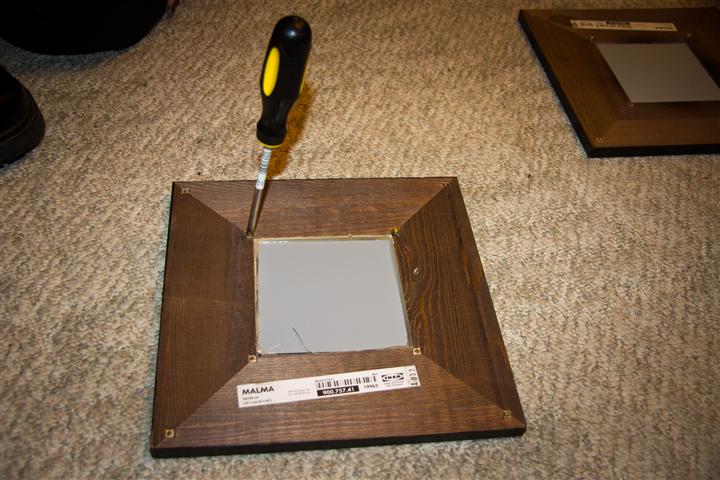


Step 2: Tie the thread provided with the product across the two wood screws. Since the mirrors are square, it doesn't matter which side you choose.

Step 3: Repeat the same process for the other mirrors!

Step4: Mount screws on the drywall/wall you wish to install the mirrors on. Pictures not shown here as this is an easy step.
That's it! You're now ready to hang them on the wall as you wish! Create some interesting patterns as we did below:

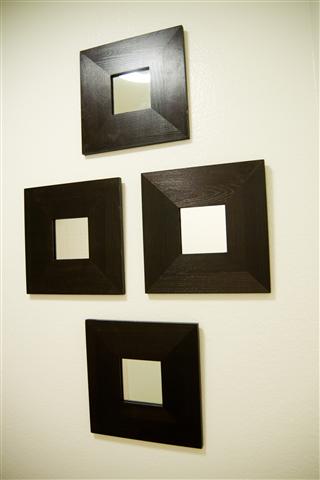
Hope you enjoyed this tutorial and found it useful, we would love to hear your comments!
Thursday, May 27, 2010
Windows White Screen of Death (WSOD)
White screen of death after windows log on/reboot
Are you a victim of what I call the "White Screen Of Death"? The White screen of death actually appears in Windows 7 immediately after reboot (at the log on screen) or immediately after logging on.
The problem is both a display driver issue as well as a left over bug from Windows 7's infamous Gamma table bug.
The only solution to get rid of the problem is again to get rid of the Gamma table bug by using a utility called DisplayProfile. Just launch it, click on another entry (not selected) and then click on the previously selected entry (it should read something like rgb***).
So to summarize:
Problem: You see a white see-thru screen after rebooting windows or immediately upon windows log on.
Affected OS: Windows 7 32 and 64 bit
Display adapter: Intel G41 and others
Solution: Run Display Profile, select any other entry
If this solution worked for you, do drop in your comments/criticisms or notes!
Saturday, December 19, 2009
Gamma table bug continued in Windows 7
For users who set up a custom color profile - whether by installing their own color profile or calibrating it via Windows 7's "Calibrate" option in the Display control panel might probably know about this bug which even Windows Vista had. In short, you lose your calibration settings when you lock the computer and unlock it. I have noticed that only the gamma settings get lost.
This bug in Windows 7 is due to a problem with how the ICC profiles are handled. The ICC profile not only tries to match the device colors but also applies the right amount of gamma. The second part doesn't work correctly in Windows 7.
Microsoft has yet to acknowledge the bug.
How to replicate the Problem:
1. Set up a custom calibration (ICC color profile) by going to the Windows 7 Control Panel->Personalization->Display and choose Calibrate.
2. Change the gamma settings.
3. When you lock and unlock the computer, the gamma settings are gone.
Possible solutions:
1. Microsoft has not released and update patch to fix this gamma bug. So you can wait for them to send a patch in the future.
2. For now, download this Utility called DisplayProfile. I usually run DisplayProfile.exe from my TaskBar. It is a standalone executable. After running it, click on any other profile and choose your current profile again. The gamma settings are automatically applies.
Here's a screenshot:

Here's a screenshot:

Happy profiling!
Tuesday, November 24, 2009
Mouse cursor size becomes big mysteriously in Windows 7 - Radeon 5700 and 5750
Those of you who got your shiny new Radeon 5700 or 5750 or any of the 5XXX series video cards must have already noticed how the mouse cursor size increases automatically and mysteriously to about twice the size. I have confirmed this finding even with the latest version of the catalyst drivers (as of 22 Nov 2009).
This issue is so easy to reproduce. If you have Windows 7 and any of the Radeon 5XXX cards with the latest catalyst drivers, you cannot miss it!
My system is a Windows 7 x64 Ultimate box with the Diamond Radeon 5750 with 1 GB RAM. I also have the latest DirectX distribution files installed (from dxwebsetup.exe).
So far the only way to decrease the cursor size back to normal in Windows is to restart the machine. If you have other solutions, do share them with us!
Wednesday, October 28, 2009
Droid Commercial - iDont device vs the Droid
I don't have a real keyboard. I can't multitask. I can't take 5-megapixel pictures. I can't take pictures in the dark. I can't customize. I can't run widgets and I can't interchange batteries. Yes, I am the iDont device. Whichever genius came up with this Droid commercial has to appreciated. But the reality is, Droid does!
This commercial brings out the naked truth that the Apple iPhone is nothing but a hype. The new Google Android phones like the upcoming Motorola Droid will pack more features for the buck and will give developers and the end users a lot of freedom and options. Google Latitude for example is an application that can only be run on a multitasking phone. The Apple iPhone just cannot do it.
Several new Android phones are trickling in, the newest ones from Motorola - the droid. The HTC iTouch with Android is another masterpiece of a phone and if it were not for the missing 3.5 mm jack, I would be all over it.
So can Google really deliver that punch with the Android? Is it the new iPhone killer? What do you think?
Subscribe to:
Posts (Atom)